My AI usage breaks roughly into two zones. The editor — Cursor for daily coding — and everything else. For a year I tried to make Cursor cover both. It can technically chat about anything, but the affordances are wrong for most non-code tasks. I eventually picked up a separate tool for the “everything else” zone and stopped fighting the editor.
This is a small productivity post about that split, and the aggregator I landed on. There’s a referral link at the bottom — disclosed up front.
The non-code zone is bigger than it looks
If you actually log what you ask AI in a week, the non-code share is surprising. Mine, rough estimate:
- Comparing two models on the same prompt before trusting one of them with a long task
- Drafting and editing prose — emails, PR descriptions, documentation paragraphs that don’t belong in an editor
- Summarizing a webpage or a 40-page PDF without copying the contents anywhere
- Image generation for slide decks, blog headers, and README banners
- “Here’s a screenshot of a UI bug from a teammate’s machine — what is this?”
- Translation between English and Mandarin, both directions
- Voice input for long thoughts I’d rather not type
Cursor is fine at the text-only versions of most of these. But you don’t draft a Slack message in Cursor. You don’t paste a screenshot of a teammate’s stack trace into Cursor. You don’t generate a slide-deck illustration in Cursor. The chat panel is built around code context — that’s its strength and its constraint.
Aggregators vs. N direct subscriptions
The alternative to one aggregator is a stack of subscriptions: ChatGPT Plus + Claude Pro + Gemini Advanced + Midjourney + a couple of niche tools. Easily $80–120 a month for things you use casually. Each has the best version of one thing — Claude’s Projects, ChatGPT’s Custom GPTs, Gemini’s Workspace integration — and you pay full freight for capabilities that overlap heavily.
Aggregators trade off bleeding-edge features for one bill and one UI. That tradeoff makes sense if you’re a casual cross-provider user, and stops making sense the moment you live deep in any one ecosystem.
The aggregators I’ve actually used long enough to compare:
- Poe — broadest model selection, feels like a developer playground, weakest browser sidebar
- ChatHub — browser extension first, decent multi-model side-by-side, weaker mobile
- Monica — best browser sidebar of the three, image gen included, polished mobile
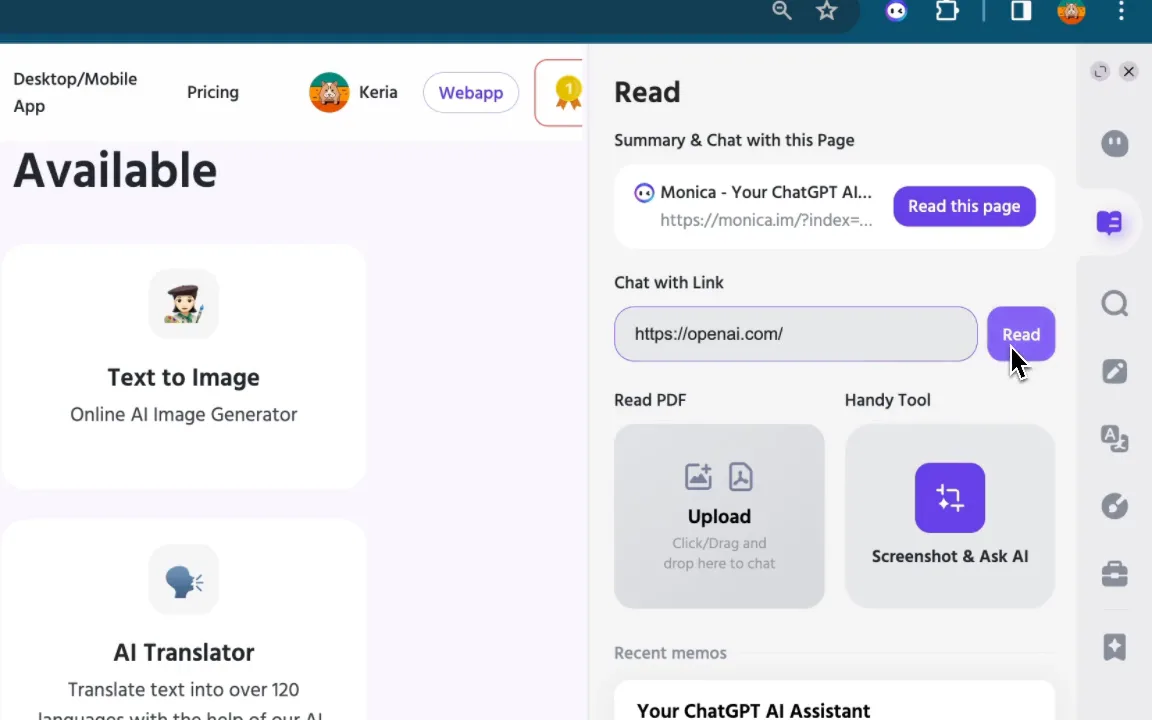
I ended up on Monica. The browser sidebar is the part I use daily — highlight a paragraph, summarize, ask follow-up, attach a screenshot, all without leaving the page. Poe and ChatHub both make this work but with more friction.
How I split the two
Cursor handles anything where the codebase is the context:
- Multi-file edits and refactors
- “Why is this test failing?” with the file open
- In-editor explanations of unfamiliar code
- Terminal-aware actions (commit messages, rebase suggestions, file-tree-aware searches)
Monica handles anything where the codebase is irrelevant:
- Cross-model checks before committing to a long prompt
- Drafts and rewrites of prose I’d be embarrassed to ship verbatim
- Browser sidebar summaries
- Image generation
- Translation
- Voice notes that need cleanup
There’s almost no overlap I care about. Cursor’s chat panel is the code chat. Monica’s chat panel is everything else. Once I framed it that way, the “should I use Cursor for this?” decision stopped happening.
What you give up
Honesty section, since affiliate posts that skip the downsides are useless:
- Model release lag. Aggregators typically trail OpenAI and Anthropic by a few days to a few weeks on new releases. If you need GPT-5-Turbo the day it ships, direct is faster.
- Pooled limits. Aggregator quotas are usually one shared pool across providers. If you hammer Claude all day, you have less GPT budget for the rest of the week. Direct subscriptions isolate that.
- Provider-specific features. Claude Projects, ChatGPT Custom GPTs, Gemini’s deep Workspace tie-ins — these are usually missing or watered-down in aggregators. If you’ve built workflows around any of them, don’t switch.
- Privacy posture. Direct providers have one privacy policy you can audit. Aggregators introduce a middle layer. Read their policy before you upload anything sensitive.
If two of those bullets matter to you, stay direct.
My current setup
- Cursor as primary editor — that’s the editor-zone tool, written about elsewhere on this site
- Monica as the browser sidebar and general chat — annual plan
- A direct Claude API key for the rare long-document work where I want max context and pay-as-you-go pricing
- No ChatGPT Plus subscription anymore — Monica covers the casual use, and the API handles the heavy use
The split holds for me because my casual AI use is genuinely casual. If you’re doing serious model-specific work — fine-tuning prompts to ship as a product, evaluating context-window edge cases, building Custom GPTs as a deliverable — go direct. For the editor / everything-else split this post is about, an aggregator wins on price and ergonomics.
Trying Monica
If you want to try Monica, the link below is a referral. You’ll go through their normal signup; I get a small commission if you upgrade later, at no extra cost to you. I’d suggest using the free tier for a week to see if the browser sidebar matches how you actually work before paying anything.
Disclosure: this is a referral link. Tinker AI earns a commission if you upgrade. Editorial position above is independent — Monica did not pay for placement or review the post.
Try Monica →
If you’ve tried other aggregators and disagree about which one wins, the contact email is on the about page — I’ll update this post when I find a better option.
